App Icon Generator

Upload your artwork for free platform-size export, or design a new app icon with AI. Preview the result before downloading your ZIP.

AI creation uses credits. Review the displayed cost before generating; resizing and platform export are free.

01
Source Image
Or generate with AI
02
Configure Platforms
Selected 2 platforms

Android launcher icon settings

Adaptive mode exports foreground and background layers with Android XML. Legacy mode exports bitmap sizes only.

03
Preview

2 Platforms

Waiting for image upload

After uploading the image, you can preview the effects of each platform in real time

Source Image

Help improve this icon tool

Having trouble uploading, choosing platforms or exporting? Tell us the page, browser, selected platform and steps to reproduce the issue.

Opens the contact form in a new tab so your work stays here. No image or settings are attached automatically. Please leave out confidential information.

Send tool feedback (opens in a new tab)
Enjoying the tool?
Support ongoing development after you export your icons.
  • 100% browser-side processing, nothing is uploaded.
  • One click export for iOS, Android, Chrome and more.

Every coffee keeps AppIconGenerator fast, private, and free.

Choose your next step

Export platform assets here. Use the maker for templates and batch export, the editor to draw a logo, or the web tool for PWA files.

Choose an app icon workflow

Make and export an existing image

AppIconGenerator turns your chosen source into platform assets. Use App Icon Maker for templates, initials, colors and multi-platform ZIP export. For iOS or Android project details, continue to the dedicated platform tool.

Generate a new source with AI

Describe a symbol, style and background in the AI Icon Generator. Review the current credit quote before generating, then inspect the selected artwork at small sizes and send it to Maker for local export.

Create a logo from your description

AI App Logo Maker

Describe your app and choose a style to generate a logo. AI generation sends your prompt to an external service and uses the credits shown before you start. Platform-size export is free.

  • AI Powered Generation
  • App name and prompt controls
  • Style and color options
  • Export generated logo files
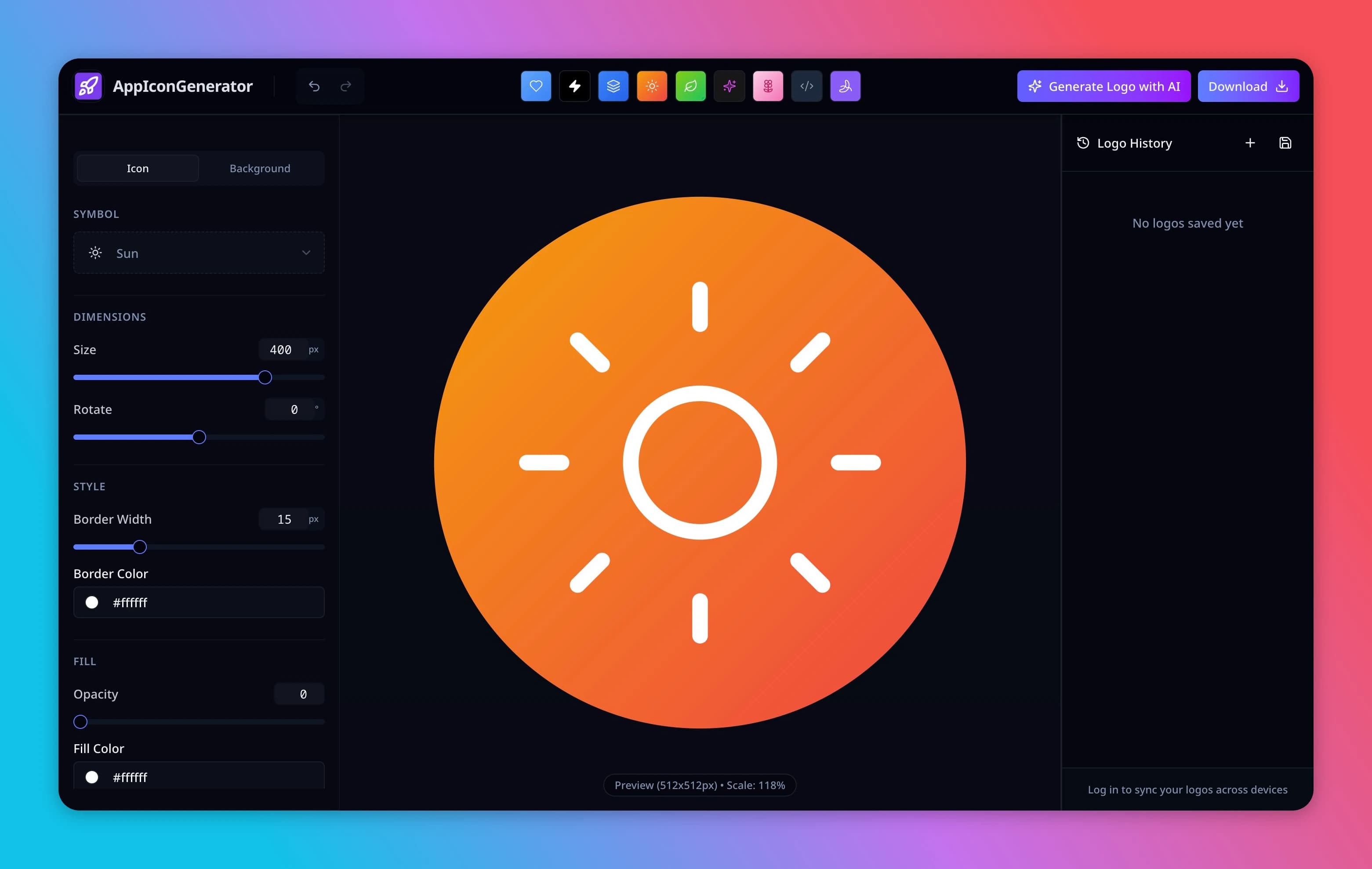
AppIconGenerator logo editor showing a sun symbol, style controls, preview canvas, and logo history panel

How to Create App Icons

Generate professional app icons in 3 simple steps

Our tool handles all the technical requirements for iOS and Android app icons.

Upload Image

Upload your 1024x1024 icon image (PNG, JPG, or SVG).

Configure

Select your target platforms and customize background colors.

Download

Get a ZIP file with all required icon sizes and names.

Why Choose AppIconGenerator?

Everything you need to generate app assets

Stop wasting time on manual resizing. AppIconGenerator handles all the technical requirements for you.

Why Choose AppIconGenerator?

Stop wasting time on manual resizing. AppIconGenerator handles all the technical requirements for you.

Generate assets for iOS, Android, Web, and Chrome Web Store in a single workflow. No need to switch between different tools.

AppIconGenerator interface showing a rocket source image, platform selection and an iPhone icon preview

Simple, Transparent Pricing

Platform-size export is free. AI Logo generation uses credits; check your balance and the displayed generation cost before starting.

Free

$0

Get started with AI Logo generation


  • Monthly credits for 1 standard text logo
  • Unlimited Icon Editor usage
  • PNG export (up to 1024px)
  • Basic style presets
  • High-resolution export
  • Priority generation
  • Commercial license
Popular

Pro

$9.9/month

For professionals and teams


  • 100 AI credits/month
  • High-resolution export (up to 2048px)
  • Priority generation speed
  • Commercial license included
  • All premium style presets
  • API access
  • Team collaboration

FAQ

Frequently Asked Questions

Icon resizing and platform asset export are free. Optional AI Logo generation uses credits. Check the displayed cost and your available balance before generating.

Images selected for resizing and ZIP export are processed locally with Canvas. AI Logo generation sends your prompt to our server and an external AI service. Do not include confidential information in prompts.

We support PNG, JPG, WEBP, and SVG. For the best results, we recommend using a high-resolution (1024x1024) PNG or SVG.

The iOS ZIP includes an AppIcon.appiconset folder with a Contents.json file and a 1024 px universal image. Inspect the asset in your Xcode version before release.

You can configure foreground artwork and a background color or image, preview common masks, and export adaptive icon resources. Test the result in Android Studio and on your target launchers.

Testimonials

Loved by Developers

Sarah Jenkins

iOS Developer

AppIconGenerator saved me hours of work. I used to manually resize icons in Photoshop, but now I just drag and drop. The Xcode export is perfect.

Mike Chen

Indie Hacker

The best icon generator I've found. The Android adaptive icon support is a game changer. Highly recommended!

Alex Rivera

Product Designer

I love that it runs locally in the browser. I don't have to worry about uploading client assets to some random server.

Emily Zhang

Flutter Developer

Simple, fast, and does exactly what it says. The Chrome extension image generator is a nice bonus I didn't know I needed.

David Kim

Mobile Dev Lead

Finally, a tool that generates the correct mipmap folders for Android. It fits perfectly into our CI/CD pipeline preparation.

Lisa Park

UI/UX Designer

The preview feature is amazing. Being able to see how the icon looks on a dark background or with different masks is super helpful.

Newsletter

Stay Updated

Get the latest app design tips and icon trends delivered to your inbox.

App Icon Generator for iOS, Android, Web, and Chrome

Create Platform-Oriented App Icon Assets Online

AppIconGenerator turns one source image or an included template into selectable icon exports for iOS, Android, web/PWA, Chrome extensions, and other available platform profiles. Preview each selected output and verify it in your project tools before release.

  • Local icon export: Images selected for resizing and ZIP export are processed in your browser. Optional AI Logo generation sends your prompt to an external AI service and uses credits.
  • Selectable outputs: Choose iOS, Android adaptive and legacy resources, Web/PWA favicons, or Chrome extension assets in one workspace.
  • Project-oriented folders: The ZIP groups files by platform and includes metadata such as Contents.json. Review the files in Xcode, Android Studio, or your target publishing tool before release.

Supported Platforms

Apple iOS & iPadOS

Export an AppIcon.appiconset folder with a 1024 px universal image and Contents.json. This export does not create dark or tinted appearances; verify it in your Xcode version.

Google Android

Create adaptive foreground and background resources, legacy mipmap PNGs from mdpi to xxxhdpi, XML references, and a separately validated 512 × 512 Play Store PNG. Test the exported resources in your Android project.

Web & PWA

Generate a favicon.ico file, PNG favicons, PWA icons, and a manifest example. Check URLs, caching, and installation behavior in the browsers you support.

Chrome Web Store

Export extension icons, a 440x280 promo tile and a 1400x560 marquee PNG from one image. Download a ZIP with a Manifest V3 starter file.

Frequently Asked Questions

Is this tool really free?

Icon resizing, platform previews, and ZIP export are free. Optional AI Logo generation uses the credits shown before you start.

Do you save my images?

Images selected for resizing and ZIP export are processed locally using Canvas. Optional AI Logo generation sends your prompt to our server and an external AI service.

What file formats do you support?

You can upload PNG, JPG, WEBP, or SVG files. We recommend using a high-resolution (1024x1024) PNG or SVG for the best results.

Maintained byContent reviewed:Contact

Review covers the page’s guidance and stated tool capabilities. Test exported files in your project before publishing.

Platform references:AppleAndroid